If you’ve ever visited a website, chances are you’ve already interacted with Nginx—without even knowing it. It’s one of the most widely used web servers in the world, powering giants like Netflix, Dropbox, and WordPress.com. But what exactly is Nginx, and why is it so popular?
In this blog, we’ll break it down step-by-step with real-world analogies and practical examples.
🚪 1. What is Nginx?
Nginx (pronounced “engine-x”) is a high-performance web server and reverse proxy server.
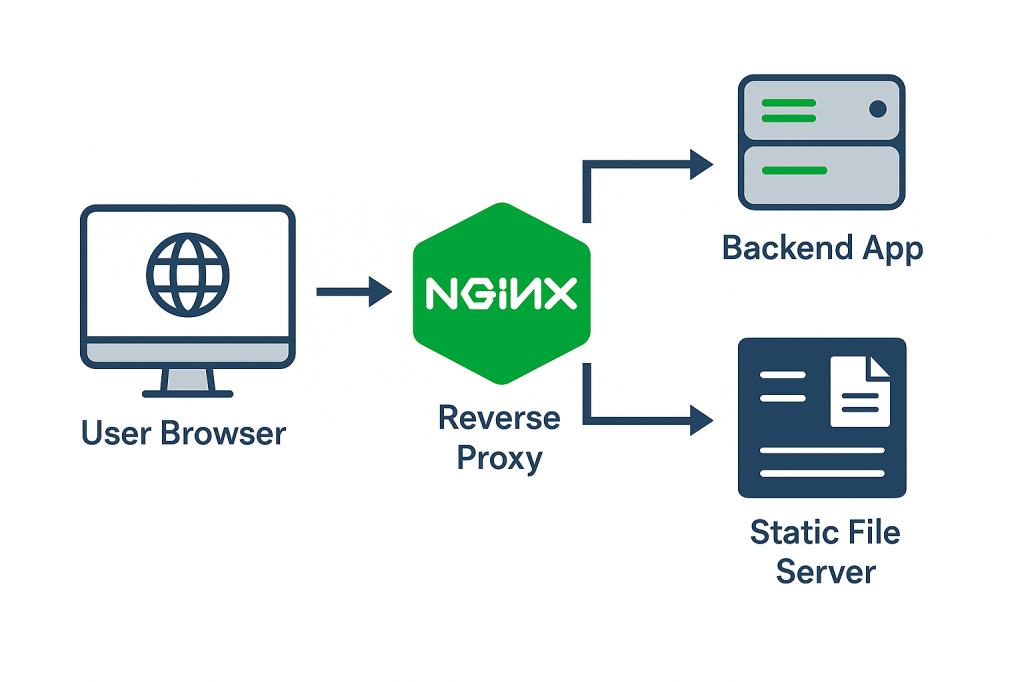
You can think of it like a smart receptionist in a busy office. Instead of letting every visitor walk straight into the office (your app/server), Nginx:
- Greets the visitors (receives requests),
- Checks what they need (e.g., a webpage or image),
- And then routes them to the right person/department (backend service or file).
🤔 2. Why is Nginx Used?
Nginx is built for speed, scalability, and efficiency. Here are some common use cases:
✅ Serving static files (HTML, CSS, JS, images)
✅ Load balancing traffic across multiple servers
✅ Acting as a reverse proxy for backend apps like Django, Node.js, or Flask
✅ Handling SSL/TLS (HTTPS) termination
✅ Rate limiting and IP blocking
✅ Hosting multiple websites on a single server (virtual hosts)
🔄 3. Nginx vs Apache (In Simple Terms)
| Feature | Nginx | Apache |
|---|---|---|
| Performance | Event-driven, handles more users | Process/thread-based |
| Static files | Very fast | Good, but slower under load |
| Config simplicity | Lean, fast config syntax | Powerful but complex |
| Popularity | Dominant in modern deployments | Still widely used |
⚙️ 4. How Does It Work?
Nginx works on the event-driven model, meaning it can handle thousands of connections with minimal resources. Unlike traditional servers that spin up one thread per request, Nginx reuses lightweight worker processes.
🛠️ 5. A Simple Example: Serving a Static Website
Let’s say you have a simple HTML file and want to serve it via Nginx.
Step 1: Install Nginx
| sudo apt update sudo apt install nginx |
Step 2: Place your files
| sudo cp index.html /var/www/html/ |
Step 3: Start Nginx
| sudo systemctl start nginx |
Now, open your browser and visit http://localhost — your static site is live! 🎉
🔁 6. What is Reverse Proxy?
Nginx can forward requests to a backend server and return the response to the client. For example, if your Django app runs on port 8000, Nginx can:
- Accept requests on port 80
- Forward them to 127.0.0.1:8000
- Return the response to the browser
This is called a reverse proxy, and it allows:
- SSL termination
- Load balancing
- Improved performance
- Added security
📌 7. Key Nginx Commands
| Command                      | Purpose                    |
| ---------------------------- | -------------------------- |
| sudo systemctl start nginx   | Start the server           |
| sudo systemctl restart nginx | Restart after changes      |
| sudo nginx -t                | Test the config for errors |
| sudo systemctl reload nginx  | Reload without downtime    |
💡 8. Final Thoughts
Nginx is like the quiet hero in many web applications—simple, efficient, and powerful. Whether you’re building a blog, running a startup app, or deploying enterprise software, Nginx can make your backend smoother and more scalable.
